How to make a cartoon GIF
Updated
To make a cartoon GIF, animate a short loop of a few seconds, then export it as a GIF small enough to share. In Animperia, a 2D animation studio in your web browser, Export makes a GIF of any scene:
- three sizes, 240p, 360p or 480p;
- the full frame rate, or half of it for a smaller file;
- up to 30 seconds long, playing on repeat, without sound.
This guide shows how, with the file sizes we measured, and tips for a loop that looks smooth and stays small.
What a GIF can and can't do
A GIF plays on repeat almost anywhere a picture can go, from chats and forums to documents and web pages. Its limits come from a file format of the late 1980s:
- 256 colors at most in each color table (W3C, GIF89a). Flat cartoon colors fit well, but smooth gradients and glows get grainy.
- Transparency is on or off. A pixel is either drawn or left see-through, with nothing in between (W3C, GIF89a).
- No sound.
- Big for what it is. In our tests, a two-second GIF at 640 × 360 came out bigger than an MP4 of the same loop at 1280 × 720 (see the table below).
So use a GIF where a GIF is wanted: a reaction, a sticker, a loop in a chat or a README. For anything with sound, or longer than a few seconds, export an MP4.
Make the loop
- Start a project. On the projects page, name it and pick a canvas. Square 1:1 suits stickers and avatars, Landscape 16:9 suits most chats and pages. The GIF comes out in the canvas's shape.
- Draw your character, or bring one in as an SVG file. A character with parts can be posed by its joints. A static object can still move, turn, scale and fade on the timeline.
- Animate a cycle. In the drawing editor's animations, Add opens New animation, and Hands-on starts an empty one: give it a name and a length, and say it's a cycle. Pose frame 1, press F6 and pose the next, with Onion skin on to see the frames around the one you're on. You can also pick the brush and draw it frame by frame.
- Put it in a scene. Drag the character from the library onto the stage, right-click it on the timeline and pick Animate: and the animation's name, so it plays as a clip.
- Make the scene a whole number of cycles long, such as 48 frames for two runs of a 24-frame walk. Then the last frame leads straight back into the first.
Export it as a GIF
- Click Export in the top bar and pick GIF as the format.
- Tick the scene. With one scene ticked, Frames … to … lets you take only part of it.
- Tick See-through background if the GIF should have no background color. Background pictures are then left out unless you untick Leave out backgrounds.
- Pick the Resolution: 240p, 360p or 480p. The dialog shows the size in pixels for your canvas: 640 × 360 at 360p for landscape, 360 × 360 for square, 360 × 640 for portrait.
- Pick the Frame rate: your project's, or half of it, marked smaller file. From 24 fps up, half is picked for you.
- Click Export. The GIF renders on the server and downloads by itself when it's ready.
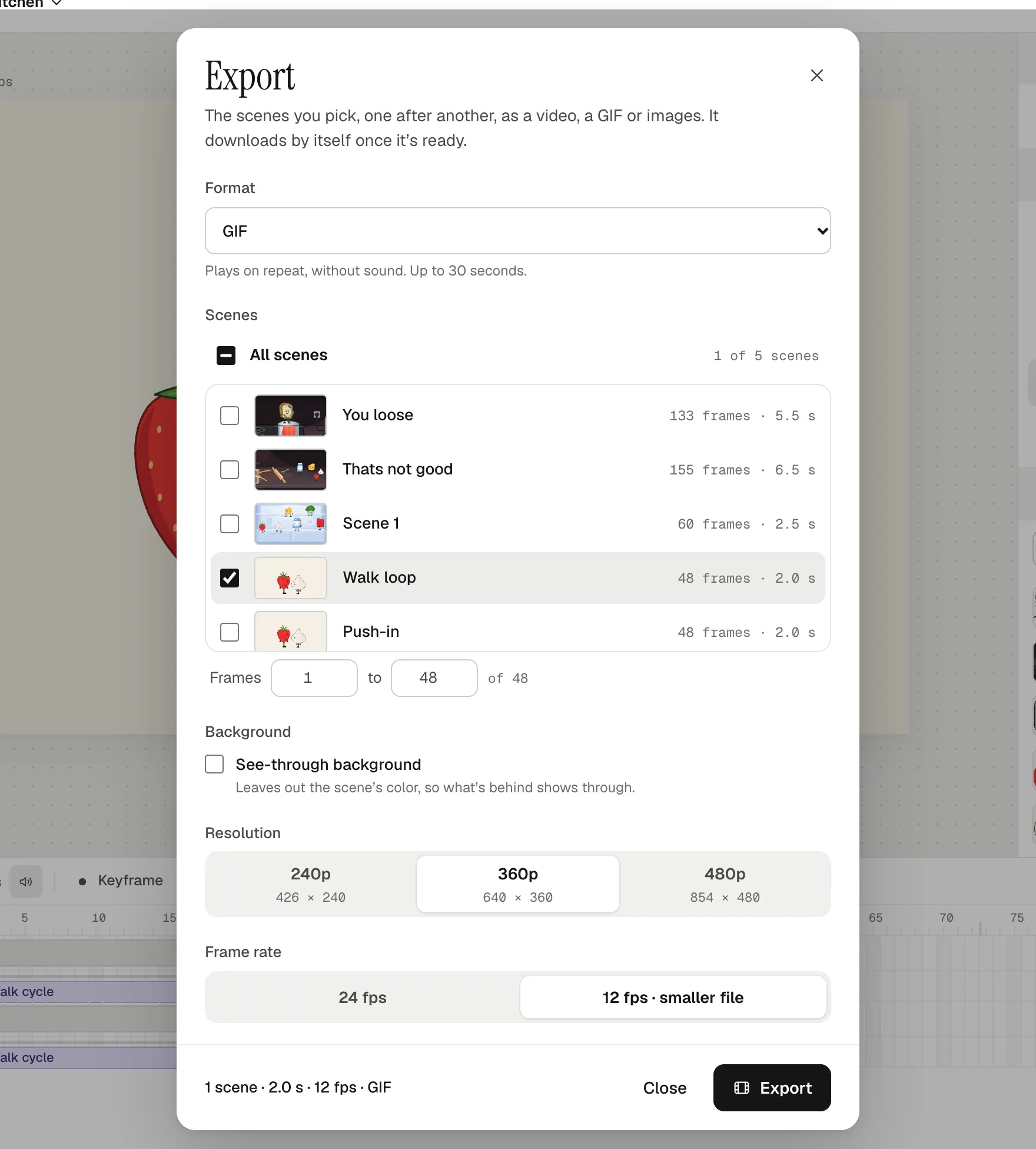
A GIF can be at most 30 seconds long. Animperia makes one palette of up to 256 colors for the whole GIF, chosen from frames spread across it, and mixes colors it doesn't have with a fine, regular dot pattern. The GIF repeats forever.
How big will it be?
We exported the walk loop above, two seconds long in a 24 fps project, at every setting on 11 October 2026:
| Resolution | 24 fps | 12 fps |
|---|---|---|
| 240p (426 × 240) | 240 KB | 130 KB |
| 360p (640 × 360) | 448 KB | 241 KB |
| 480p (854 × 480) | 620 KB | 328 KB |
And some variations at 360p and 12 fps:
| The same two seconds… | File size |
|---|---|
| with a see-through background | 199 KB |
| with a slow camera push-in | 318 KB |
| as an MP4 at 720p and 24 fps, for comparison | 217 KB |
Two things stand out. Half the frame rate nearly halves the file. And the camera push-in made the GIF a third bigger, because a moving camera changes every pixel of every frame.
Tips that keep a GIF small
- Use half the frame rate. 12 fps still reads as smooth cartoon motion for most loops.
- Pick the smallest size that reads. 240p is about half the size of 360p. Check it at the size people will see it.
- Keep the camera still. Animperia's GIFs redraw only the part of each frame that changed, so a still camera and a still background cost little.
- Let less move. A blink or a wave makes a smaller GIF than a whole character walking.
- Use flat colors. Gradients, glows and soft shadows need colors the palette doesn't have, and the dot pattern that fakes them adds to the file.
- Keep it short. The size grows with every frame: our whole 6.5-second kitchen scene came to 680 KB at 360p and 12 fps.
- Try both backgrounds. See-through made our walk loop smaller, but made a stretch of a busy kitchen scene bigger (249 KB instead of 170 KB). Export both and keep the smaller.
How small is small enough depends on where it goes. Discord, for example, raised its upload limit for free accounts to 20 MB on 13 August 2026 (Dexerto). A GIF that loads fast is still nicer to see.
A loop that reads well
- One idea per GIF. A blink, a shrug, a wave, a jump. People see it at a glance, often small and on repeat.
- One to three seconds. Long enough to read the action, short enough that the repeat feels like a rhythm.
- Make the end meet the start. Animate a cycle, and make the scene a whole number of cycles long. A pose that pops back at the loop point is what makes a GIF feel cheap.
- At half the frame rate, use an even number of frames. The GIF takes every other frame, so a 48-frame scene loops evenly, while a 47-frame one jumps a little at the loop point.
- Frame it close. At 240p, a character in a wide shot has a face a few pixels across. Go closer, and use thick outlines and big shapes.
- Ease the motion. Slowing in and out of each pose (motion tweens can ease in, out or both) makes a short loop feel alive, not mechanical.
- Add words big, if at all. Small text turns to mush at GIF sizes. Draw it large with the text tool, or leave it to the post the GIF goes in.
Questions
Can a GIF have a transparent background?
Yes. Tick See-through background in Export. Its edges are hard, because a GIF pixel is either shown or not: Animperia leaves out pixels less than half opaque. For soft edges, export a see-through WebM or PNG images instead, as in how to export an animation with a transparent background.
Can I make a GIF longer than 30 seconds?
No. Export an MP4 for anything longer.
Why does my GIF look grainy?
A GIF has at most 256 colors, so gradients and glows are faked with a pattern of dots. Flat fills avoid it. A bigger size or the full frame rate won't fix it.
Is it free?
Yes. Animperia is free during the beta, and GIFs have no watermark. Sign up for the beta and make your first loop.
Discord is a trademark of Discord Inc. Animperia isn't affiliated with or endorsed by Discord.