How to lip-sync a 2D character, with a free mouth chart
Updated
Lip sync is the part of animation that makes a character look like it's really saying the words you hear. The good news: you don't need a drawing for every letter. Cartoon mouths get by with a small set of shapes, about nine, each one covering a group of sounds. The craft lies in choosing which sounds to show, holding each shape long enough to read, and letting the mouth follow the acting rather than the spelling.
This guide covers the mouth shapes, a free chart you can use, how to lip-sync a line by hand, and how automatic lip sync does the same job.
A free mouth chart
The chart below shows nine mouth shapes we drew for this guide. Each card lists the sounds the shape covers, an example word, the letter Rhubarb Lip Sync uses for it, and the matching group from Preston Blair's classic chart. You're free to save it, print it and use it for your own animation and classes: download it as a PNG picture or a PDF to print.
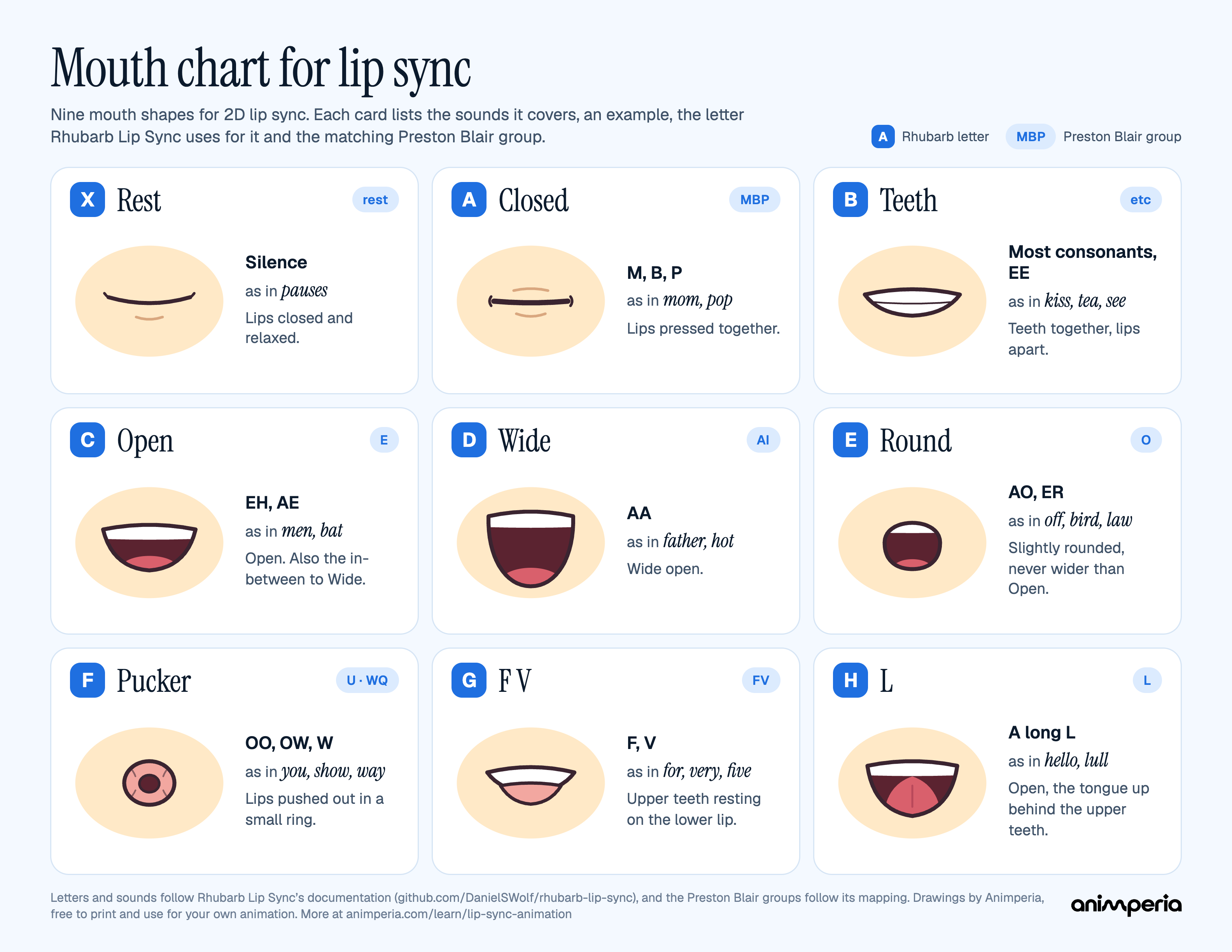
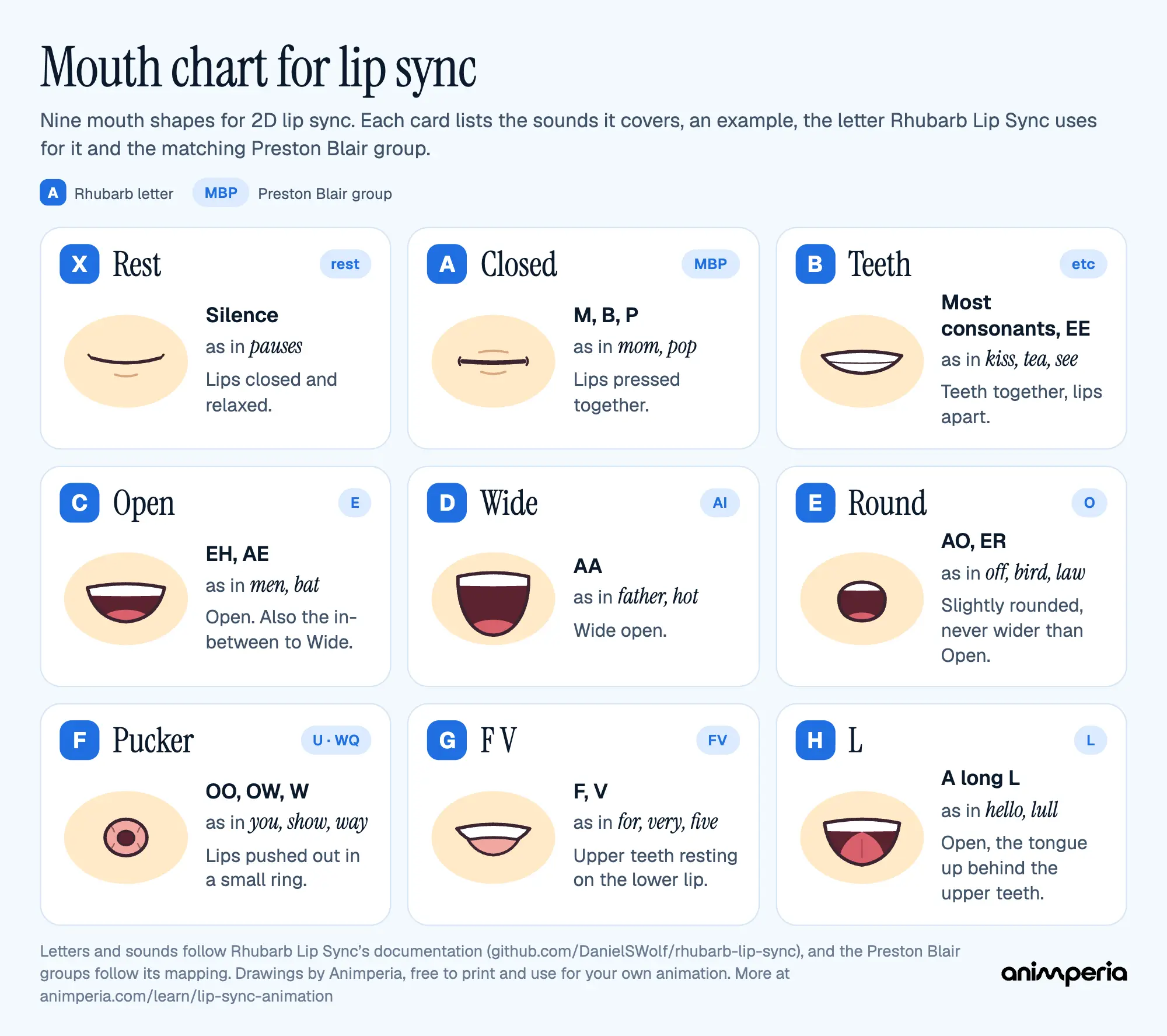
The nine mouth shapes
| Shape | Sounds | As in | Rhubarb | Preston Blair |
|---|---|---|---|---|
| Rest | Silence | pauses, listening | X | rest |
| Closed | M, B, P | mom, pop | A | MBP |
| Teeth | Most consonants (K, S, T, D, N…), and EE | kiss, tea, see | B | etc |
| Open | EH, AE | men, bat | C | E |
| Wide | AA | father, hot | D | AI |
| Round | AO, ER | off, bird | E | O |
| Pucker | OO, OW, W | you, show, way | F | U (and WQ) |
| F V | F, V | for, very | G | FV |
| L | A long L | hello, lull | H | L |
The letters and sounds follow Rhubarb's documentation, and the Preston Blair column follows the mapping Rhubarb uses when it exports Blair's names. Blair's set also has a separate W-and-Q drawing; Rhubarb times W with its puckered shape, so on the chart it shares the Pucker card.
A little history: Rhubarb's documentation says its six basic shapes, A to F, were invented at the Hanna-Barbera studios for shows such as Scooby-Doo and The Flintstones. Preston Blair, an animator who worked on Disney's Fantasia, covers mouth movements for dialogue in his book Cartoon Animation, whose revised edition Walter Foster Publishing brought out in 2020 (checked on 11 October 2026). Our chart uses drawings of its own: borrow the idea, not someone else's mouths.
How many mouth shapes do you need?
Six is the minimum: Closed, Teeth, Open, Wide, Round and Pucker (A to F). Add F V and L when your style shows teeth and tongue clearly, and a Rest mouth for when the character isn't talking. Rhubarb's documentation suggests that Rest can look almost like Closed, with the lips relaxed instead of pressed.
How to lip-sync a line by hand
1. Listen first, then act it out
Play the line many times before you draw anything. Say it yourself in front of a mirror, or film yourself on your phone: you'll see which sounds really move the mouth and which ones barely show. Note where the stresses fall and where the character takes a breath.
2. Break the line into sounds, not letters
Spelling misleads. Phone starts with an F, knee has no K, and the is usually just a quick tongue tap. Write the line out as you hear it ("HEH-LOW, MY FREND") and mark the sounds that need a mouth shape.
3. Key the big shapes first
Start with the shapes the audience can't miss: the open vowels (Open, Wide, Round), the lips pressed together on M, B and P, and the teeth on the lip for F and V. A word like my needs the lips to meet; if they don't, viewers notice at once. Fill the small consonants in afterward, or skip them.
4. Hold each shape long enough to read
A mouth that changes on every frame looks like chattering. Hold each shape for at least two frames, the same as animating on twos, and longer on stressed vowels. When the speech gets fast, use fewer shapes: show the vowels and the closed lips, and let the rest go.
5. Put the mouth a frame or two early
Many animators move the mouth one or two frames before the sound. That way the shape is already there as the sound arrives, and the sync feels tight instead of late. Try it both ways on a playback and keep what reads better.
6. Match the acting
The mouth is the last layer. The head, brows, eyes and body carry the emotion: a nod on the stressed word, a blink before a big line, the jaw dropping wider when the character shouts. Close to Rest between phrases, and let a pause be a pause.
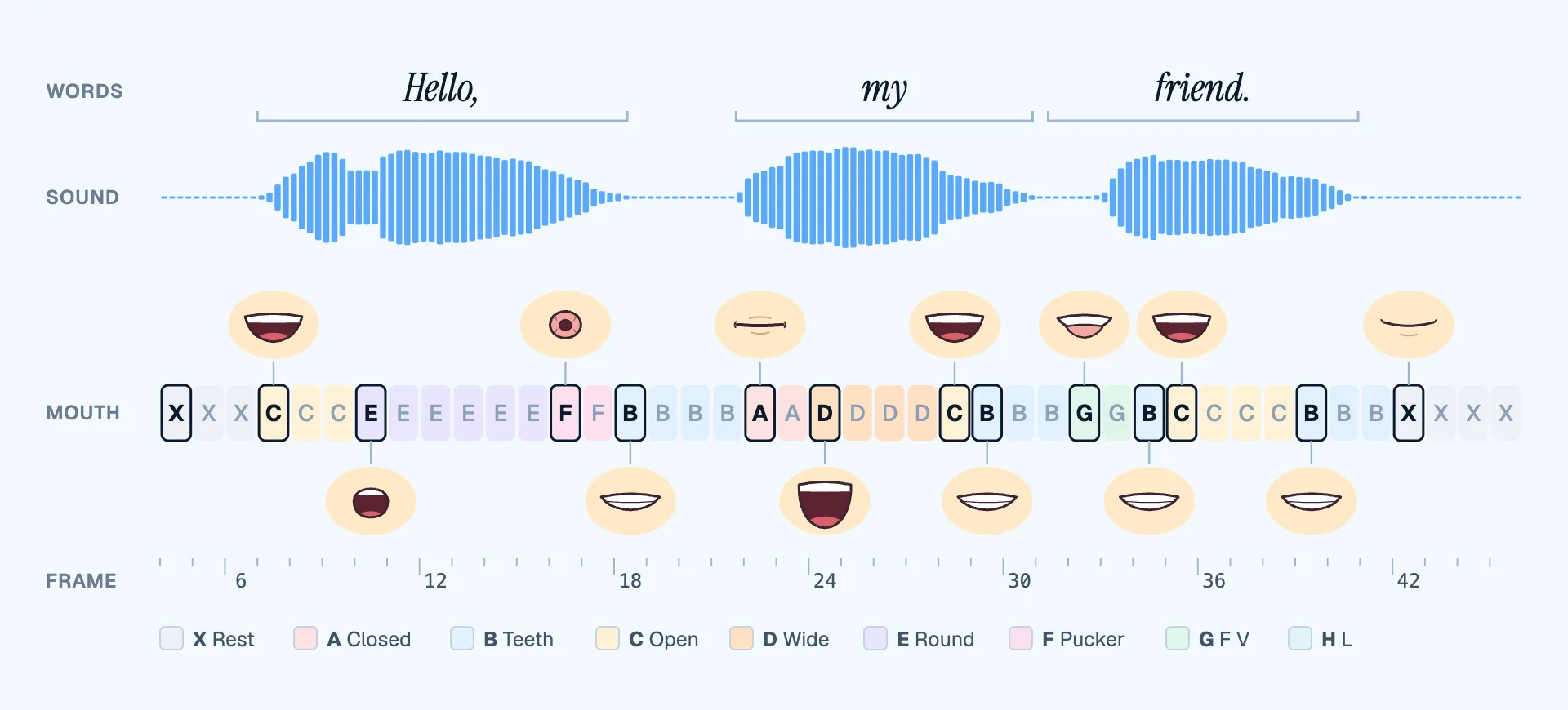
The strip above is a two-second line, timed automatically by Rhubarb and laid out frame by frame. Notice how few shapes change: Round holds for six frames on hello, the lips close for two frames on the M of my, and the teeth meet the lip on the F of friend. Most frames are holds.
Common lip sync mistakes
- Animating every letter. Too many shapes make the mouth flutter. Show the sounds that matter and hold them.
- Missing the closed lips. M, B and P need the lips to touch, even for a single frame.
- Late mouths. If the shape lands on the same frame as the sound or after it, the sync feels slow. Move it earlier.
- Snapping to Wide. Going straight from closed to wide open looks like a pop. Rhubarb's documentation suggests passing through Open on the way.
- A frozen face. Lips alone look like a puppet. Move the jaw, the head and the brows with the line.
Lip sync with automatic timing
Automatic lip sync does steps 1 to 4 for you. A speech recognizer listens to the recording, works out which sounds are said and when, and turns them into mouth shapes on the right frames. Typing the line's words helps it in English; for other languages, tools such as Rhubarb fall back on the sounds alone.
What it can't do is the acting. Treat the result as a first pass: check the stressed words, move the mouth earlier if it feels late, and animate the head, brows and body yourself.
In Animperia, you drop a voice line on a character you drew, and its mouth follows the words on the stage, while you scrub and in the export. You can redraw each of its mouth shapes, move the mouth up to five frames ahead of the voice, and switch lip sync off for any single line. See how lip sync works in Animperia.
Drawing your own mouth set
- Start from Rest. Draw the mouth your character wears when it's quiet, then make the others from it, so they all share its position, width and line weight.
- Keep it in style. A character with dot eyes and no nose doesn't need detailed teeth. Match the mouths to the face.
- Test the flow. Closed, Open, Wide should feel like one movement, and so should Open, Round, Pucker. Rhubarb suggests that Round is never wider open than Open.
- Check it moving. Play a short line on a loop and watch the mouth alone, then the whole face.
If you'd like to try it with your own character, Animperia is free during the beta: draw a character in your browser, give it a mouth, and drop your voice on it.
Questions
What is a viseme?
A viseme is the shape the mouth makes for a group of sounds that look alike. P, B and M sound different but look the same, so they share one viseme: the closed mouth. A mouth chart is a set of visemes drawn for a character.
Should lip sync be on ones or twos?
Most 2D lip sync holds shapes for two frames or more, even when the rest of the animation is on ones. A shape that lasts a single frame often doesn't register.
What's the difference between the Preston Blair and Rhubarb names?
They're two names for nearly the same shapes. Blair's groups are named after sounds (MBP, AI, O, U, FV, L, rest), while Rhubarb uses the letters A to H and X. The chart above gives both.