An Adobe Character Animator alternative for characters you draw
Updated
Adobe Character Animator turns your performance into animation: a webcam follows your face, a microphone drives the mouth, and a puppet copies you live. Adobe Express's "Animate from audio" does something simpler: you record a line, and one of Adobe's ready-made characters says it.
Animperia works differently. You draw your own characters, or import them as SVG, animate them on a keyframe timeline, and drop your recorded lines on them: their mouths follow the words automatically. It runs in a desktop browser on Windows, Mac or Linux, and it's free during the beta.
Here's the honest summary. If you want live performance, webcam face tracking or streaming as a cartoon, stay with Character Animator: Animperia doesn't do any of that. If you want your own characters to talk with your own voice, in scenes you animate and export as videos, read on.
Character Animator in 2026
As of 11 October 2026, Adobe Character Animator is still available. Its latest release, version 26.0 from January 2026, brought improvements and stability updates and no new features, as did version 25.6 in November 2025 (Adobe; Wikipedia). We found no announcement that it's ending. Adobe put a different app, Adobe Animate, in maintenance mode this year, which is covered on our Adobe Animate alternative page.
It comes in two modes:
- Starter mode is free and starts from ready-made puppets (adobe.com).
- Pro features, including Puppet Maker and puppets made from your own Photoshop or Illustrator artwork, come with a Creative Cloud Pro plan, listed at US$69.99 a month on an annual plan, billed monthly, with a discount for new subscribers' first months (adobe.com, 11 October 2026).
It's a desktop app for Windows and macOS (Adobe system requirements). It lip-syncs live from your microphone as you perform, or afterwards from a recorded audio file with Timeline > Compute Lip Sync Take from Scene Audio (Adobe tutorial).
Adobe Express "Animate from audio"
Adobe Express, Adobe's web and mobile design app, can animate a character from a recording: you record or upload up to two minutes of audio, pick one of Adobe's characters (a unicorn, a fox, a robot and others), and download the video. Adobe says it has a free plan (adobe.com, 11 October 2026; Adobe Community, 21 July 2026). Adobe's page doesn't mention using a character of your own.
It's quick for a talking clip. What it isn't made for is a cartoon with your own cast, several characters in one scene and animation beyond the talking.
Character Animator, Express and Animperia side by side
| Adobe Character Animator | Adobe Express Animate from audio | Animperia | |
|---|---|---|---|
| Where it runs | A desktop app for Windows and macOS | Web and mobile | A desktop browser on Windows, Mac or Linux |
| Price | Starter free; Pro with Creative Cloud Pro, US$69.99 a month | A free plan, per Adobe | Free during the beta |
| Your characters | Ready-made puppets in Starter; your own Photoshop or Illustrator art in Pro | Adobe's characters | Drawn in Animperia, or imported as SVG |
| How the mouth moves | Live from your microphone, or from recorded audio | From your recording | From your uploaded recording, timed with Rhubarb Lip Sync |
| The rest of the body | Webcam face and body tracking, and triggers you fire during a take | Animated for you | Keyframes, motion tweens and poses you animate yourself |
| Voices | Your own voice | Your own voice | Your own voice, with optional character voice effects |
| Export | Video | Video | MP4 at 720p or 1080p with sound, GIF, see-through MOV and WebM, PNG images |
Adobe's columns follow the pages linked above, checked on 11 October 2026.
What you can do in Animperia
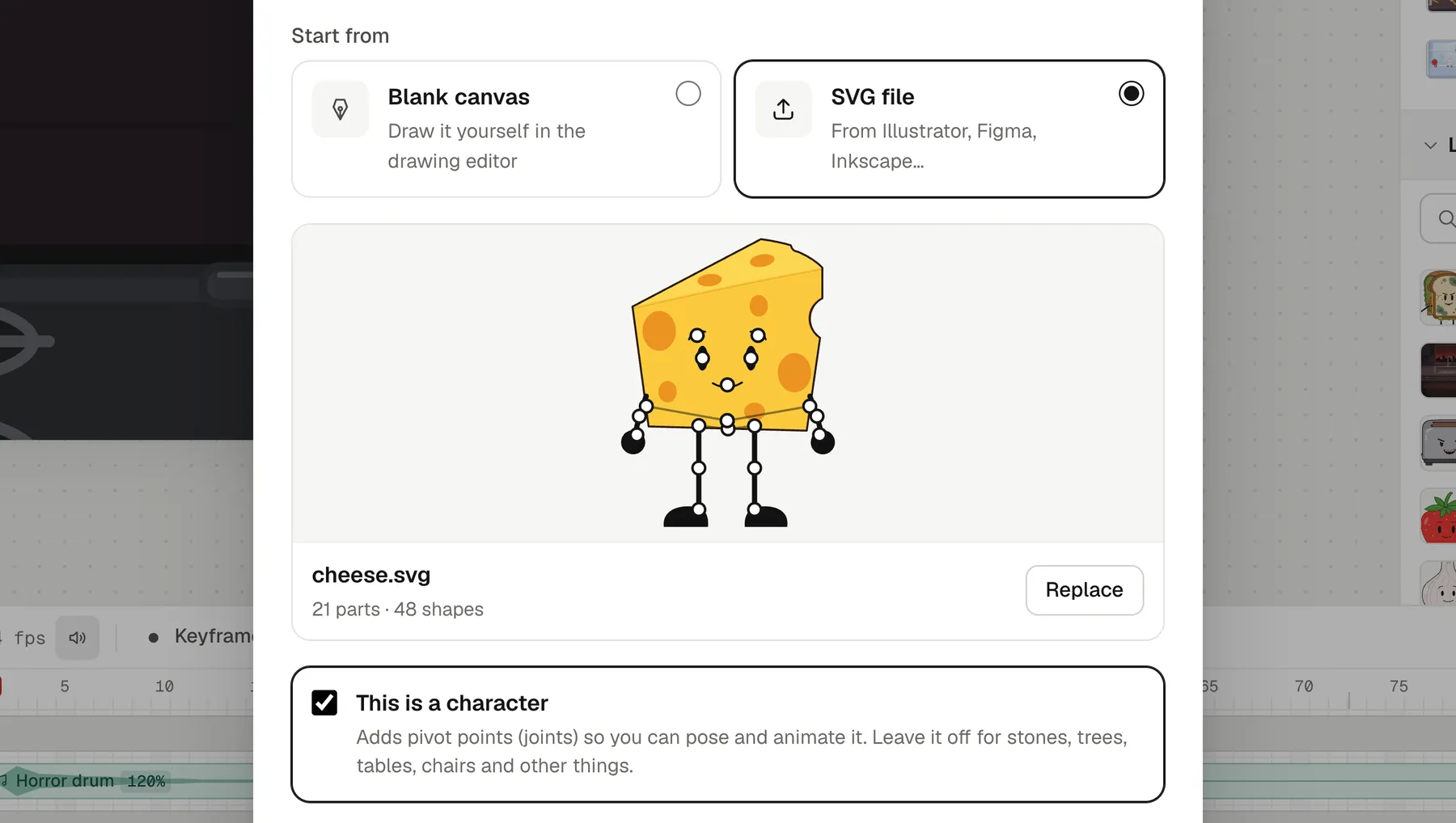
- Draw your own cast. Draw characters on a blank canvas with vector tools, or import SVG files from Illustrator, Inkscape or Figma. Make their arms, legs, head and mouth into parts, and pose them by their joints.
- Lip-sync from recorded lines. Drop a voice line on a character, and its mouth follows the words on the stage, while you scrub and in the export. Each character has eight talking mouth shapes plus its resting mouth, and you can redraw them all by hand. More about lip sync.
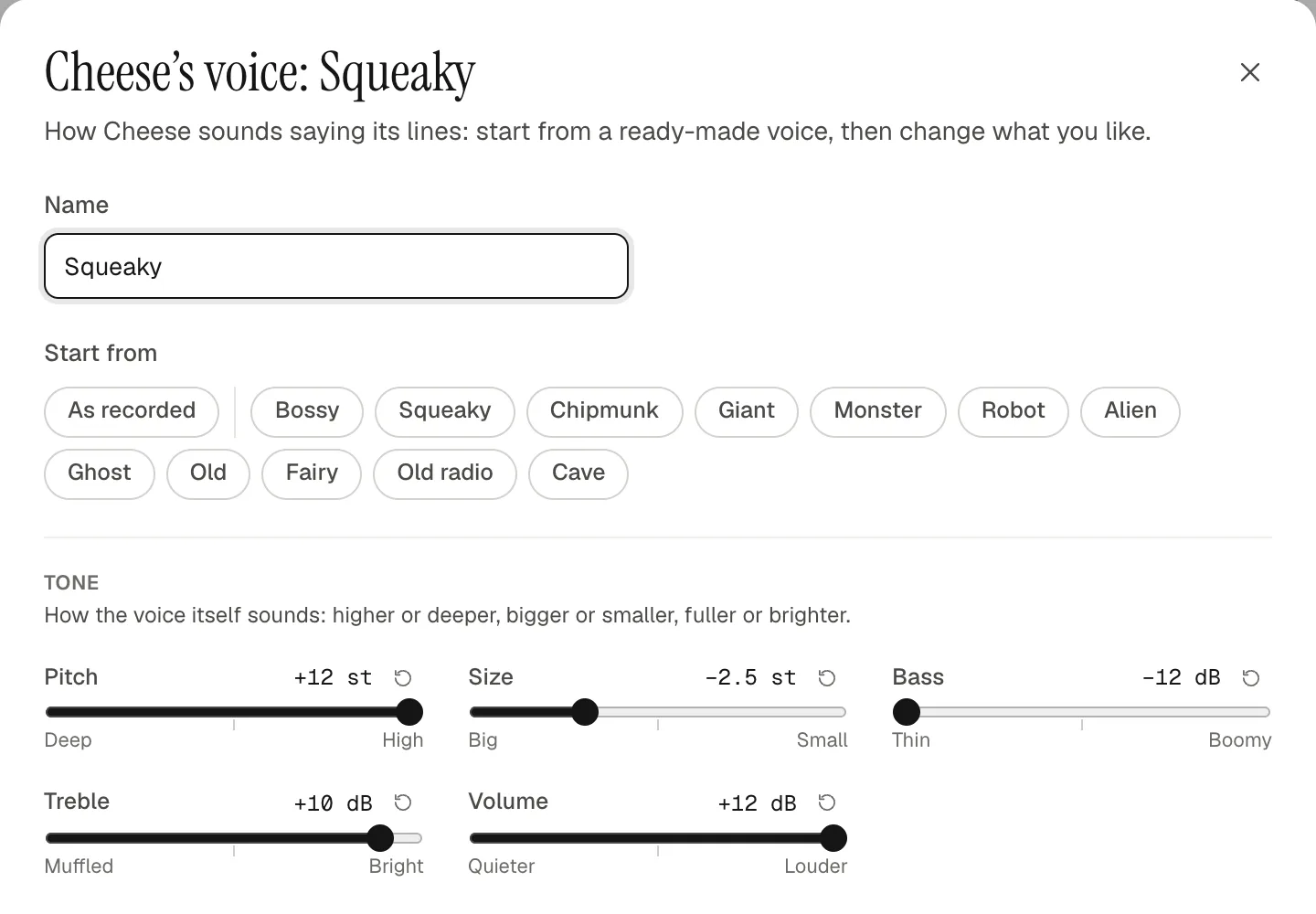
- Voice the whole cast yourself. Give each character a voice of its own, starting from twelve ready-made voices such as Squeaky, Giant or Robot, and take out background noise with one click.
- Animate the scene. Use the timeline's keyframes, motion tweens, a camera, masks, and animations like walks and blinks that play as clips.
- Export a finished video. MP4 with sound, or a see-through MOV or WebM to lay over other footage.
What Animperia doesn't do
As of 11 October 2026, Animperia can't:
- Track your face or body. There's no webcam input and no live performance.
- Stream as a character. There's no live output to OBS or video calls. You can export a see-through WebM and use it as a video in OBS.
- Open Character Animator puppets. Puppet files and Photoshop documents don't import. Vector artwork comes in as SVG.
- Record in the browser or speak text. Record your lines with any app and upload them. There's no text-to-speech.
- Use triggers or replays. Movements are animated on the timeline, not triggered by keys during a take.
- Run on phones or offline. It's made for a computer's browser and needs an internet connection.
How to bring a character over
Character Animator puppets start as layered Photoshop or Illustrator files. Vector art from Illustrator can come into Animperia; pixel art from Photoshop needs redrawing or tracing first, because characters in Animperia are vector drawings.
- Save the artwork as SVG from Illustrator, keeping its layers or groups: arms, legs, head, mouth.
- Import it. In the library, click +, pick Object, choose SVG file and drop the file in. Tick This is a character: the groups become parts that hang from each other as the file nests them, and a group named Mouth can talk.
- Check the joints. In the drawing editor, the Bone tool moves a part's joint, and Pivots lets you pose the character by its joints.
- Draw its mouth shapes. Under Mouth shapes in the part list, redraw the eight talking mouths in your style, and play them with Talk test. The mouth chart shows which shape goes with which sound.
- Give it a voice. Upload your recording, drop it on the character, and press play.
Questions
Can I use my webcam to animate?
No. Animperia has no webcam or face tracking. You animate with keyframes and poses, and the mouths follow your recorded lines.
Can I import my Character Animator puppet?
No. Puppet files and Photoshop documents can't be imported. Artwork saved as SVG can, and its groups become the character's parts.
Is Animperia free?
Yes, during the beta. You sign up with your email: while the beta has room, you get a link to set your password and start.
Does it work on Mac and Linux?
Yes. Animperia runs in a desktop browser on Mac, Linux and Windows computers. We test it in Google Chrome.
Can a character talk in a language other than English?
Yes. Pick Other language when you give it a voice, and the line is timed by its sounds instead of its words.
About this comparison
This page compares Animperia as it is on 11 October 2026 with Adobe Character Animator and Adobe Express as Adobe describes them on the pages linked above. If you'd like to see your own character talk, sign up for the beta: Animperia is free while it's in beta.
Adobe, Adobe Express, Character Animator, Illustrator and Photoshop are either registered trademarks or trademarks of Adobe in the United States and/or other countries. Animperia isn't affiliated with or endorsed by Adobe.