Animperia, a Moho alternative in your browser
Updated
If you animate rigged characters in Moho, or learned on it back when it was called Anime Studio, you already think in bones, poses and reusable actions. Animperia is a 2D animation studio in your web browser that works with the same ideas: you draw a character, join its parts with bones, pose it with pivots, keep its moves (a walk, a blink) as animations, and let a voice line move its mouth.
Here’s the honest summary. Moho’s rigging goes much deeper: Smart Bones, meshes, physics and a 3D camera have no counterpart here. Animperia is simpler, runs on any desktop computer with a browser, Linux included, and costs nothing during the beta. If you make cartoons on your own and want to animate from any computer without installing anything, it’s worth a look. If your rigs live on Smart Bones, stay with Moho.
Moho in October 2026
Moho has a long history, and it’s back with the company that made it. Mike Clifton’s company Lost Marble made it in 1999, Smith Micro bought it in 2007 and sold it as Anime Studio, the name went back to Moho with version 12 in 2016, and Lost Marble bought it back in December 2020 (Wikipedia).
As of 11 October 2026, Lost Marble sells Moho 14 in two editions (Lost Marble):
- Moho Pro 14: US$399.99, a one-time purchase. Upgrades from Pro 13.x cost US$119.99 for a limited time.
- Moho Debut 14: US$59.99, a one-time purchase, for first-time animators and hobbyists, with limited versions of Pro features such as Smart Bones and meshes (Lost Marble).
Both run on Windows and macOS and need an internet connection once, to activate. The free 14.4 update added export to game engines and 3D software (Lost Marble). A 30-day trial is available, though it can’t export or import files (Lost Marble).
What will feel familiar
Animperia doesn’t copy Moho’s tools, but most of what you do every day has a counterpart.
| In Moho | In Animperia |
|---|---|
| Bones, a skeleton you draw over the character | The Bone tool (M) joins one part to another and sets where it turns |
| Inverse kinematics, dragging a hand to pose the arm | Pivots: drag a wrist or an ankle and the whole limb bends |
| Bone hierarchy | Parts hang from parts: move the upper arm, and the forearm and hand come along |
| Actions you reuse | A character’s animations (a walk, a blink, a wave), played as clips on the scene’s timeline. Several can play at once |
| Switch layers for mouths | Eight mouth shapes per character, plus the mouth as drawn for silence |
| Lip sync from an audio file | Drop a voice line on a character and its mouth follows the words |
| The timeline with keys and interpolation | Keyframes and motion tweens, evenly or easing in, out or both |
| Point animation | Reshape a shape on any frame of an animation, and the frames in between morph |
| Frame-by-frame layers | Drawing layers in an animation, one drawing per keyframe, with onion skin |
| Layer masks | Mask layers with shapes you can keyframe |
| The camera | A Camera layer you pan, zoom and turn with keyframes |
| SVG import | SVG file import, where a file’s groups can become a character’s parts |
Moho’s column follows Lost Marble’s features page, checked on 11 October 2026.
Moho and Animperia side by side
Here’s how they compare, with Lost Marble’s details as of 11 October 2026.
| Moho Pro 14 | Animperia | |
|---|---|---|
| Where it runs | An app for Windows and macOS (Lost Marble) | A web browser on a Windows, Mac or Linux computer |
| Price | US$399.99 once, or US$59.99 for Debut (Lost Marble) | Free during the beta |
| Your files | .moho project files on your computer | Saved online as you work. Download a whole project as one .animperia file and import it again on any account |
| Bringing art in | Vector drawing, SVG and layered PSD files (Lost Marble) | Vector drawing and SVG files for characters, and pictures (PNG, JPG or WebP) as backgrounds |
| Rigging | Bones, IK, Smart Bones, Vitruvian Bones, meshes, Curvers and constraints (Lost Marble) | Bones, pivots that bend a whole limb from its wrist or ankle, reshaped frames and a warp grid |
| Automatic motion | Physics, particles, dynamics and wind | None |
| Lip sync | From an imported voice file, or switched by hand | From a voice line, in English or any other language, with mouth shapes you can redraw |
| Export | Video and images, and characters for game engines | MP4 at 720p or 1080p, green-screen MP4, see-through MOV and WebM, GIF and PNG images |
| Working offline | Yes, once activated | No: it needs an internet connection |
What Animperia doesn’t do (yet)
Moho has had over 25 years to grow, and some of it isn’t here. As of 11 October 2026, Animperia has:
- No Smart Bones or Vitruvian Bones. To change a shape as a joint bends, you reshape it on the frames that need it.
- No meshes, Curvers or Liquid Shapes. A warp grid bends a whole object on the stage, and that’s as far as deformation goes.
- No physics, particles or dynamics. Follow-through is animated by hand.
- No 3D space or depth of field. The camera pans, zooms and turns in 2D.
- No graph editor. Tweens are even or ease in, out or both, with no custom curves.
- No PSD rigs or bitmap characters. Characters are vector drawings. Pictures can be backgrounds.
- No game engine export and no scripting.
- No offline mode. If the connection drops mid-edit, your changes wait in the browser and save when it’s back.
How to move your characters over
Animperia can’t open .moho files, so the rig and the animation stay in Moho. Your artwork can come over, and the rigging is quick to redo.
1. Start from your source art. Many Moho characters begin in Illustrator, Inkscape, Affinity Designer or CorelDRAW, and Lost Marble’s features page describes bringing them in as SVG. Those same SVG files import into Animperia. We couldn’t find an SVG export for Moho 14 on Lost Marble’s pages, so for a character drawn inside Moho, export a still and redraw it in Animperia’s drawing editor with the pen and brush.
2. Import it as a character. In the library, click +, pick Object, and on the Hands-on tab choose SVG file. Tick This is a character: each group in the file becomes a part, hanging from the group it sits in, and turning where it meets it. A preview counts the parts and shapes and says what a drawing can’t keep.
3. Rebuild the rig. In the drawing editor, the Bone tool (M) hangs one part from another and moves its joint. Turn on Pivots and run the Wiggle test to see every limb swing.
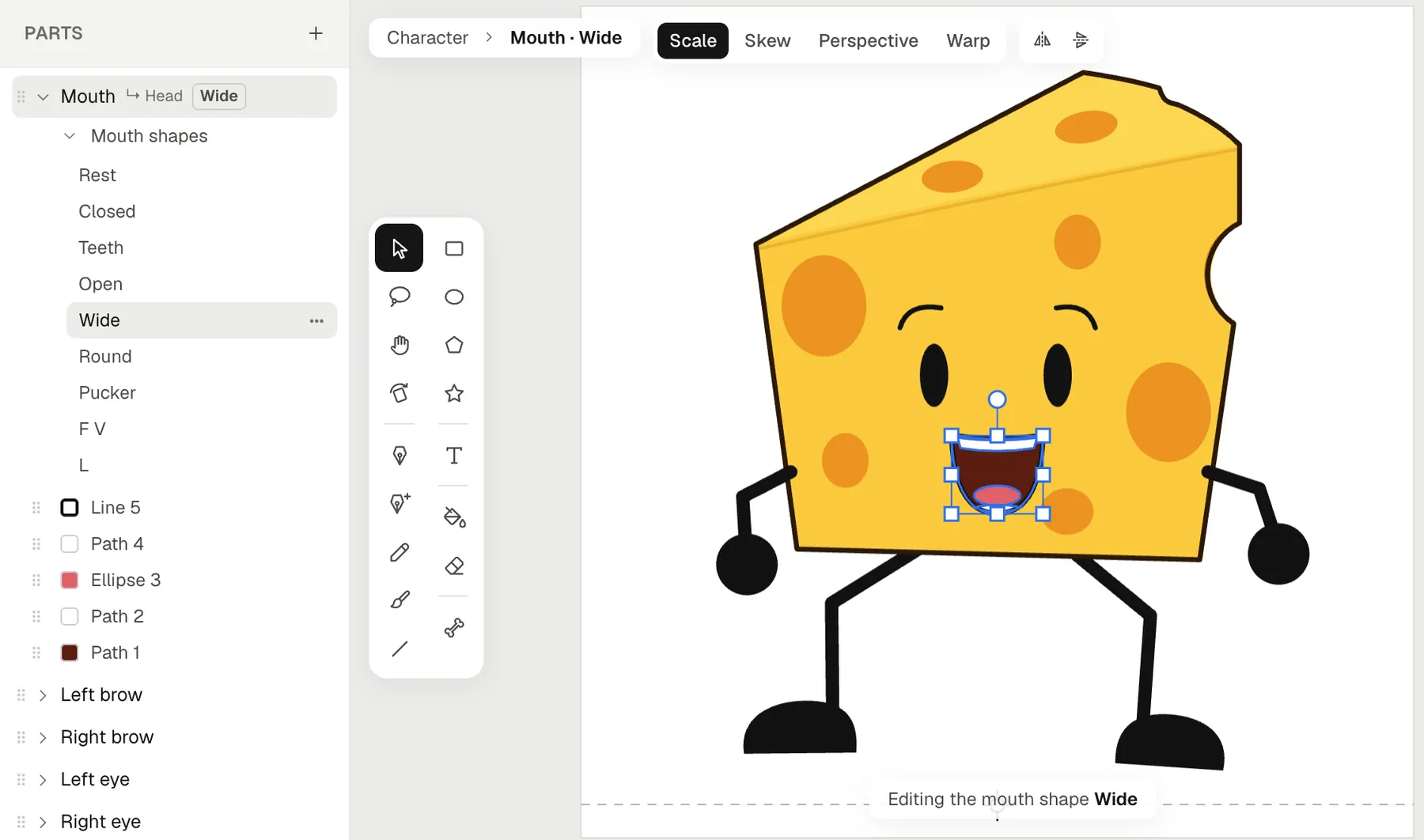
4. Bring the mouth over. Name the mouth’s group Mouth, and the character can talk. Under Mouth shapes in the part list, draw its eight shapes (Closed, Teeth, Open, Wide, Round, Pucker, F V and L), redrawing your Moho switch set, and play them with Talk test.
5. Remake your actions. Each action becomes an animation: Add, then Hands-on for an empty one. Pose frame 1 with Pivots, press F6 and pose the next. In a scene, right-click the character on the timeline and pick Animate: and the animation’s name to play it as a clip.
Questions from Moho users
Is there a Moho version that runs online?
No. Moho is a desktop app for Windows and macOS (Lost Marble). Animperia runs in a browser tab, so there’s nothing to install, and it works the same on Windows, Mac and Linux. We test it in Google Chrome.
Is there a free Moho alternative?
Animperia is free during the beta. Moho itself has a 30-day trial, and Moho Debut costs US$59.99 once (Lost Marble).
Can I open my Moho or Anime Studio files?
No. Animperia can’t read Moho’s or Anime Studio’s project files (.moho, .anime or .anme). Bring your artwork over as SVG, as above, and rig and animate it again.
Does Animperia have Smart Bones?
No. The closest thing is reshaping: double-click a shape in an animation, drag its points on a frame, and the frames in between morph toward it.
Does lip sync work like Moho’s?
Both time a mouth to a voice file by themselves. In Animperia, you drop the voice line on the character, and the mouth swaps between its eight shapes on the stage, while you scrub and in the export. It works in English or any other language, and a transcript, if you add one, makes English more exact.
Do I have to use AI?
No. You can draw, rig, pose and animate everything by hand. The AI helpers are optional.
About this comparison
This page compares Animperia as it is on 11 October 2026 with Moho as Lost Marble and the sources linked above describe it. To see how your characters feel in a browser, sign up for the beta and bring one over. It’s free during the beta.
Moho and Anime Studio are trademarks of their owners. Animperia isn’t affiliated with or endorsed by Lost Marble or Smith Micro.