2D character rigging and bone animation, online
Updated
A rig turns a drawing into a puppet. Instead of redrawing a character for every pose, you split it into parts (a head, upper arms, forearms, hands, thighs, shins, feet), tell each part where it turns, and then move the joints. This is cut-out animation, the same idea as paper puppets with pins at the elbows, done on a computer.
Animperia does 2D rigging in a web browser. You draw your character, or import it as SVG, make its pieces into body parts, check the joints with the Bone tool, and pose it by dragging a wrist or an ankle. There's nothing to install, and it’s free during the beta.
What you get
| Tool | What it does |
|---|---|
| Make as body part | Turns a group of shapes into a part: a head, an arm, a tail or anything you name. It hangs from the part it lies on and turns where they meet |
| Bone tool (M) | Shows the rig as bones, joint to joint. Drag from one part to another to hang it there, or drag a joint to move it |
| Pivots | Shows the joints as handles. Drag a wrist or an ankle and the whole arm or leg bends; drag a tip to turn just that part |
| Wiggle test | Swings every limb around its joint, so gaps and joints in the wrong place show up before you animate |
| Animations | Pose the rig frame by frame on a timeline, with keyframes, tweens and onion skin, then play the result in any scene |
Everything here is done by hand. If you’d rather not group dozens of shapes yourself, there’s an optional AI helper, Find parts, that groups them into parts for you, and you can change or undo what it does.
Make the parts
A rig starts as an ordinary drawing. In the drawing editor, each group of shapes is a row in the list on the left. Open a group’s ⋯ menu and pick Make as body part, or select a few shapes on the canvas and press ⌘G (Ctrl+G on Windows and Linux).
A dialog asks Which part is it? Pick one of the quick choices (Head, Body, Left arm, Right leg, Left hand and so on) or type a name of your own, such as Wing or Antenna. Under the name are two choices that matter:
- Kind says what the part is: a head, an eye, a mouth, an upper arm, a forearm, a hand, a thigh, a shin, a foot, or Other. Animperia guesses it from the name, so a part called Left forearm is a forearm. A part of the kind Mouth can lip-sync.
- Attached to is the part it hangs from. A forearm hangs from an upper arm, a hand from a forearm. Animperia suggests the part its shapes lie on.
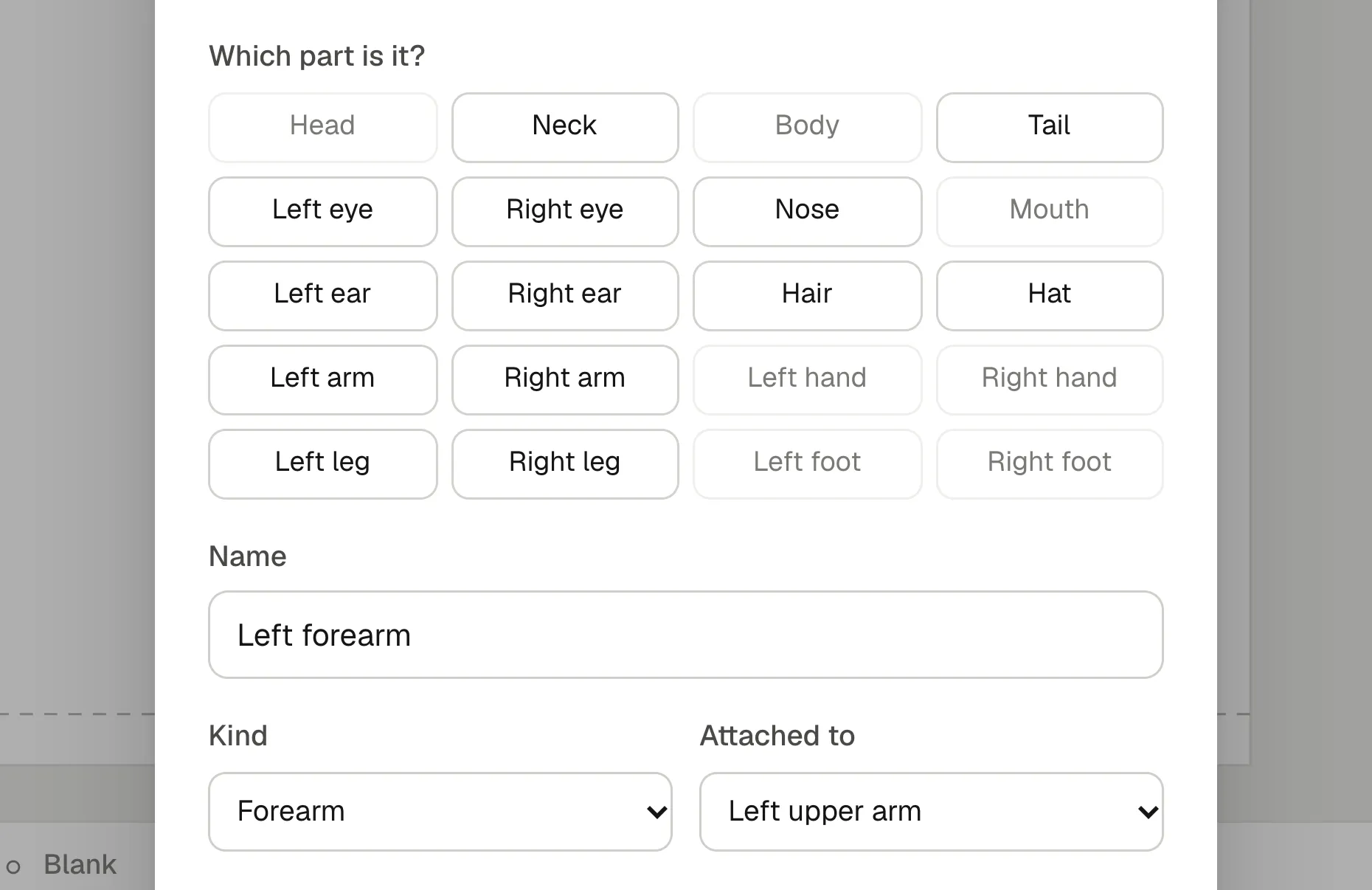
The first part you make turns the drawing into a character. The joint goes where the part meets its parent, at the shoulder for an upper arm or at the neck for a head, and you can move it later.
A character doesn’t have to be a person. A ghost with no legs, a fish with a tail, a milk carton with stick arms: any anatomy works, because you decide which parts exist and what hangs from what.
Check the joints with the Bone tool
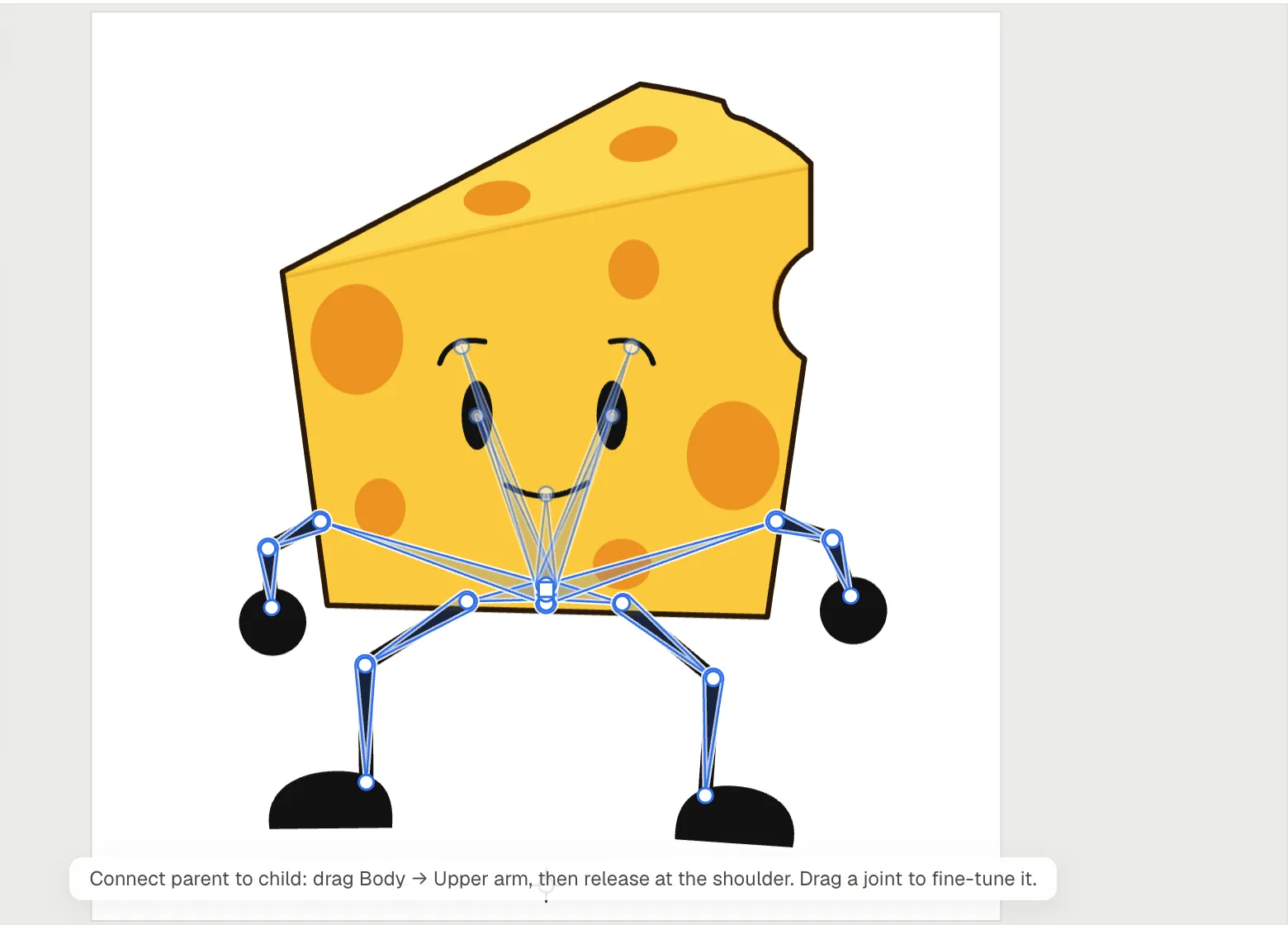
Press M for the Bone tool and the rig appears as bones over the drawing, each from the joint of the parent to the part’s own joint. The main part, usually the body, has a small square. Now you can:
- Move a joint. Drag its round end to where the part should really turn, such as the center of the elbow rather than its edge.
- Hang a part elsewhere. Drag from the parent to the child and let go where they should meet: from Body to an upper arm, released at the shoulder.
A good joint sits in the middle of the round end where two parts overlap. Our guide to rigging a 2D character explains why, with pictures.
Pose it by dragging
Press Pivots in the editor’s top bar and every joint gets a handle:
- Drag a wrist or an ankle and the whole limb bends, the shoulder and the elbow (or the hip and the knee) turning together.
- Drag a tip, such as the end of a hand or the top of the head, to turn just that part.
- Drag the main handle to move the whole character.
Outside an animation, the pose you set becomes the character’s rest pose, the one every scene and animation starts from. Inside an animation, it’s the pose of the frame under the playhead.
The wiggle test
Before you spend an evening animating, press Wiggle test. Every limb swings around its joint at once, back and forth, until you press Stop. If a gap opens at an elbow, or a forearm slides away from its arm, the ends need more overlap or the joint needs moving.
Bone animation on a timeline
Once the character is saved, open Add under its animations and choose Hands-on for an empty animation: a name, a length and whether it loops. The timeline docks under the drawing:
- Pose frame 1, move to another frame (or press F6 for a keyframe) and pose again. The frames in between follow, easing between your poses.
- Onion skin shows the frames around the playhead, blue before and green after, so you can see the arc of a swing.
- Reshape a part on any frame by double-clicking it and dragging its points: a limb drawn in one piece can bend, and the frames in between morph.
Back in a scene, drag the character onto the stage, right-click it on the timeline, pick Animate: and the animation’s name, and it plays there as a clip. Clips repeat, stretch and combine, so a walk and a blink can play at once. Our guide on animating without drawing every frame shows how far that goes.
Bring a character in from SVG
If you draw in Illustrator, Inkscape or Figma, keep each body part in a group of its own and export SVG. In Animperia, open New object, choose SVG file and tick This is a character: the file’s groups become parts that hang from each other the way the file nests them, and a group named Mouth can talk. Leave the box unticked to import plain groups and make the parts yourself, as the rigging guide does.
What it doesn’t do (yet)
As of 11 October 2026:
- Parts turn as solid pieces. There’s no mesh deformation or skinning. To bend a limb drawn in one piece, reshape its outline on the frames that need it.
- Rigs stay in Animperia. Exports are videos, GIFs and images, not rigs for game engines. You can download a whole project as one .animperia file and import it again, but there’s no SVG or skeleton export.
- It’s made for computers. Animperia runs in a desktop browser on Windows, Mac or Linux, and we test it in Google Chrome. It isn’t made for phones or tablets.
Questions
Is it free?
Yes, Animperia is free during the beta. You sign up with your email, and accounts are for people aged 13 and over.
Do I need to install anything?
No. It runs in a browser tab and saves your work online as you go.
Is this cut-out or puppet animation?
Yes. A rigged character in Animperia is a digital cut-out puppet: rigid parts that turn at joints. You can still draw frame by frame on layers of their own, in front of the character or behind it, for smears, effects or a hand drawn in a new pose.
Can I use it with a mouse?
Yes. Rigging and posing are all clicking and dragging. A pen tablet only matters if you want pressure in your brush strokes.