How to animate a walk cycle, step by step
Updated
A walk cycle is a loop of two steps that plays over and over, so a character can walk for as long as you need without you animating every step. It's the exercise every animator comes back to, because a walk shows weight, timing and personality all at once.
This guide gives you the four key poses of a step, the timing that makes a walk feel slow or brisk, a reference sheet to keep beside you, and the whole process in Animperia, from the first pose to a character walking across a scene.
The four key poses of a step
A full cycle is two steps: right foot forward, then left foot forward. Each step uses the same four key poses, with the sides swapped for the second step.
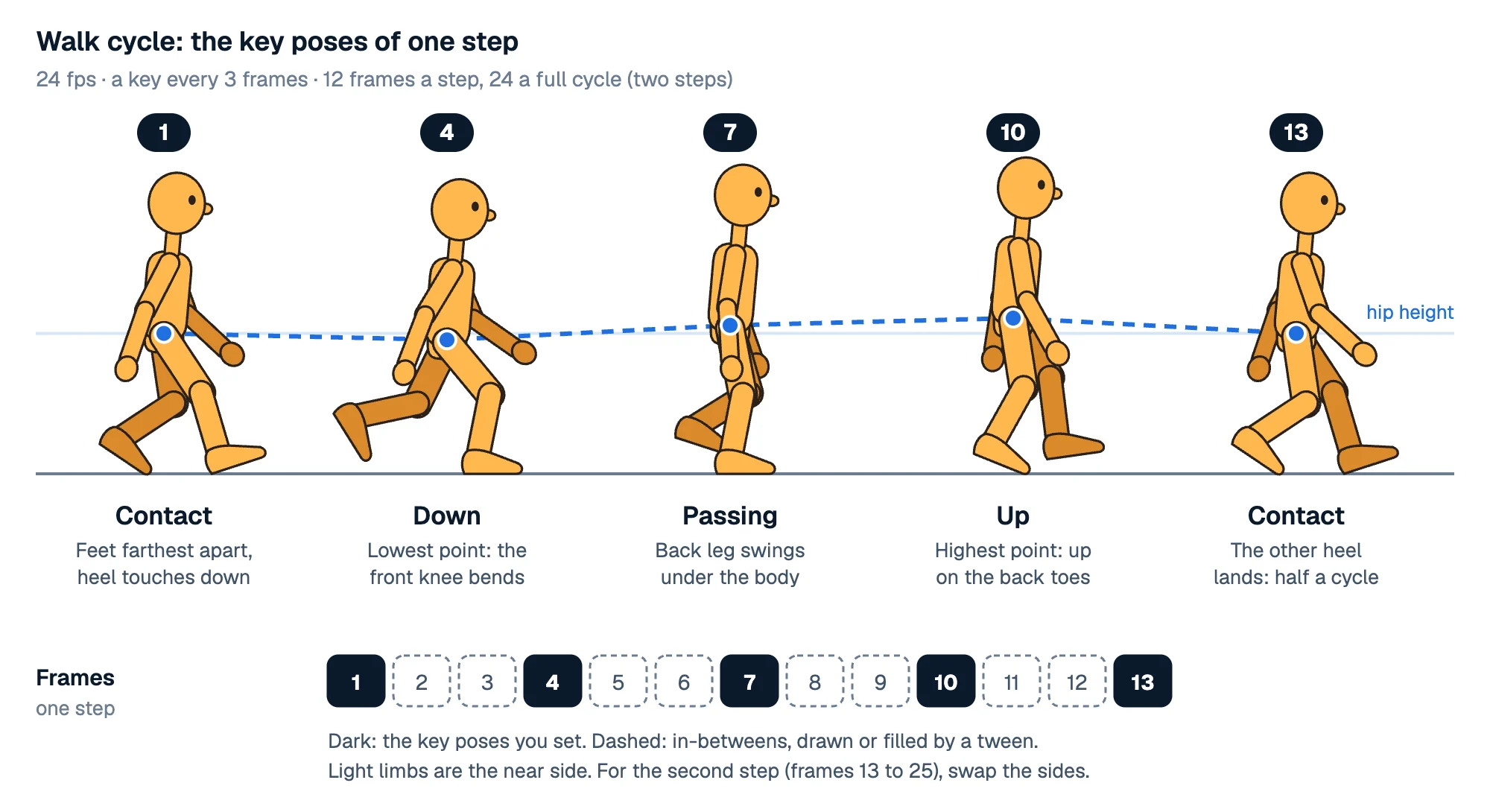
- Contact. The legs are at their widest. The front heel touches the ground with the toes up, and the back foot pushes off its toes. The arms swing opposite to the legs: front leg, back arm.
- Down. The front leg takes the weight and the knee bends to absorb it. This is the lowest point of the body. The back foot leaves the ground.
- Passing. The supporting leg is straight under the body, and the other leg swings past it with the knee bent and the foot lifted. The arms pass the body too.
- Up. The supporting leg pushes off its toes and lifts the body to its highest point. The swinging leg reaches forward, ready for the next contact.
Then the other heel lands: that's the contact of the second step, the same pose mirrored.
The rise and fall of the hips is what makes a walk look heavy and alive. Without it, a character glides like it's on rails. Keep the bob small, a few percent of the character's height, and let the head and torso follow it.
Walk cycle timing: how many frames?
Timing is counted in frames per step. At 24 fps, 12 frames a step is a relaxed, normal walk, and the whole cycle (two steps) takes 24 frames, one second.
| Frames a step at 24 fps | Steps a second | Feels like |
|---|---|---|
| 8 | 3 | Brisk, in a hurry |
| 12 | 2 | A normal walk |
| 16 | 1.5 | Slow, relaxed |
| 20 or more | 1.2 or fewer | Tired, sneaking, heavy |
With 12 frames a step, the four keys land on frames 1, 4, 7 and 10, and the next contact on 13. With 8 frames a step, try keys on 1, 3, 5 and 7. If you animate on twos, as most hand-drawn walks are, you draw every other frame between the keys. Animating on twos explains how.
A few things to check once the keys are in:
- The feet don't slide. The foot on the ground stays in one spot until it lifts (in a walk in place, it slides back at an even speed).
- The arms swing on arcs from the shoulder, never in straight lines, and a little behind the legs' timing.
- The weight shifts: the down pose sinks, the up pose rises.
- It loops cleanly: the last frame flows into the first without a hitch.
How to animate a walk cycle in Animperia
In Animperia, a character keeps its moves as animations of its own: you pose the walk once in the character's drawing editor and then play it in any scene as a clip that repeats.
1. Get a character with legs that bend
The character needs separate parts for the thighs, shins and feet (and the arms), each turning at its joint. Draw one yourself and turn each limb into a part: Make as body part in a group's ⋯ menu, or ⌘G with its shapes selected. Or bring one in as an SVG file. The Bone tool (M) moves a joint or hangs a part from another one. Press Pivots to see the joints, and run the Wiggle test to check that every limb swings where it should.
2. Start an empty cycle
In the character's drawing editor, click Add under Animations and pick Hands-on. Name it "Walk", set the Length to 1 second and leave Cycle ticked: its last frame leads back to its first. Create empty animation opens it on the timeline, every frame in the rest pose.
3. Pose the keys
With Pivots on, drag a joint to pose the body: drag an ankle and the whole leg bends at the knee, drag a wrist and the arm follows, drag the hips to move the whole body up or down. To be exact, select a part and type its rotation or offset in the panel on the right.
- On frame 1, pose the contact.
- On frame 4, the down pose. On frame 7, passing. On frame 10, up.
- Then the second step on frames 13, 16, 19 and 22, with the legs and arms swapped.
When you change a frame, Animperia bends the frames around it to fit, easing in and out up to the part's keys on either side, so the in-betweens are there as you go. To change one frame only, tick Only this frame or hold Alt while you drag.
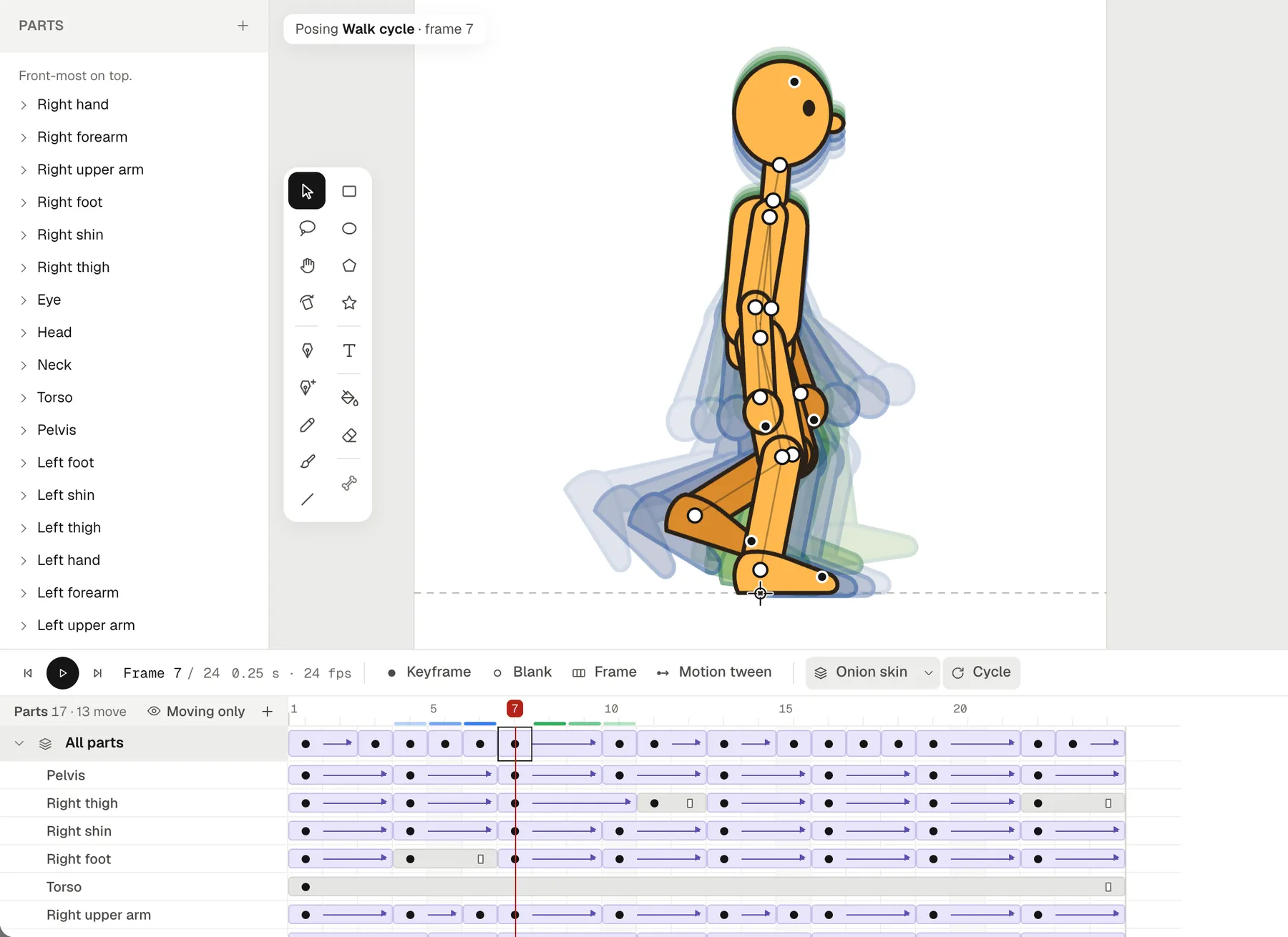
Turn on the Onion skin to see the frames before the playhead in blue and after it in green, and press play to watch the loop. If a stretch between two keys should move at an even speed, select those frames, right-click and pick Create motion tween, then Evenly.
4. Set the speed
The animation's length sets the speed: 1 second for a normal walk, longer for a slower one. Change the length and the frames are retimed to fit.
5. Walk across the scene
- Drag the character from the library onto the stage.
- Right-click its row on the timeline and pick Animate: and the walk's name. The walk plays as a clip, repeating for as long as the clip lasts. Drag the clip's edge to make it longer.
- Go to the last frame, press F6 for a keyframe, and move the character across the stage. Then press Motion tween, evenly, without easing.
- Scrub the playhead and watch the planted foot. If it slides backward, the character moves too slowly: drag the end keyframe to an earlier frame, or move the character further on it. If it slides forward, do the opposite.
A clip's Options… set its own duration, so the same walk can play faster in one scene without changing it anywhere else. Animations combine, too: give the character a blink clip on top of the walk and it does both at once.
Questions about walk cycles
How many frames is a walk cycle?
At 24 fps, a normal walk cycle is 24 frames: two steps of 12. A brisk walk is about 16 frames (8 a step), a slow one 32 or more.
What are the poses of a walk cycle?
Contact, down, passing and up, once for each step. Contact and passing are the main keys, while down and up give the walk its weight.
Should I animate the walk in place or moving forward?
In place, for a cycle you'll reuse: the character stays put while the feet slide back, and the scene moves it forward. Animate it moving forward when a walk happens once, for example a few steps to a chair.
Why does my walk look like it's floating?
Usually the hips don't go up and down, or the feet slide. Lower the down pose, raise the up pose, and match the speed the character moves across the scene to the speed of the feet.
Can I use this reference sheet?
Yes: keep it open while you animate, and check your poses against it. It's drawn for this page, with a mannequin made in Animperia.