How to make a storytime animation, from story to upload
Updated
A storytime animation is a true story from your life, told in your own voice over simple animation of a cartoon you. To make one, pick a story with a clear payoff, write it the way you'd tell it and record it. Then draw your cartoon self once and animate shot by shot to the recording, with a visual joke on every punchline.
This guide follows a 30-second example, Pancake Disaster, made by hand in Animperia, a 2D animation studio in your browser.
What a storytime animation is
It's a YouTube genre. A 2020 article in the Animation Studies journal describes it as short animated content specific to YouTube, built on autobiographical, mostly comedic stories and a recognizable persona, often in a simple, animatic-like style (Pappis, Animation Studies, checked 15 October 2026). Its examples include TheOdd1sOut and Jaiden Animations.
So the narrator is you, as a round-faced cartoon people know by its hair or hoodie. The voice carries the video, and cutaways show what the words can't, like your face at the worst moment.
Pick a story and write the script
Good storytime stories are small: one event, one twist, one payoff. "The time I set off the smoke alarm making pancakes" beats "my whole summer". Write it the way you'd tell a friend, with the best detail saved for last, and read it aloud as you go.
How long will it be? American English conversation runs at about 150 words a minute (VirtualSpeech, citing the National Center for Voice and Speech, checked 15 October 2026), so 900 words is about six minutes. Time one paragraph for your own pace: our 76-word example runs 30 seconds.
Mark the pictures in the script. A note of what's on screen beside every line becomes your shot list:
| Narration | On screen |
|---|---|
| "So, when I was twelve, I decided to make pancakes for my mom's birthday." | Me in my room, wide |
| "How hard could it be? I had watched exactly one video." | A shrug, the camera pushing in |
| "Step one, flour. A lot of flour. Most of it ended up on the dog." | Cut to the kitchen |
| "Then the smoke alarm went off." | Close-up on the smoke alarm |
| "At six in the morning. My mom came running down the stairs, holding a tennis racket." | Back on me, shocked |
| "And the pancake? It was still stuck to the ceiling when we moved out." | The pancake on the ceiling |
Record the narration
A quiet room matters more than an expensive microphone:
- Turn off what hums, like a fan. Curtains or a closet full of clothes cut the echo.
- Stay a hand's width from the mic, a little to one side so your breath doesn't pop.
- Record in short takes, and if you stumble, say the sentence again.
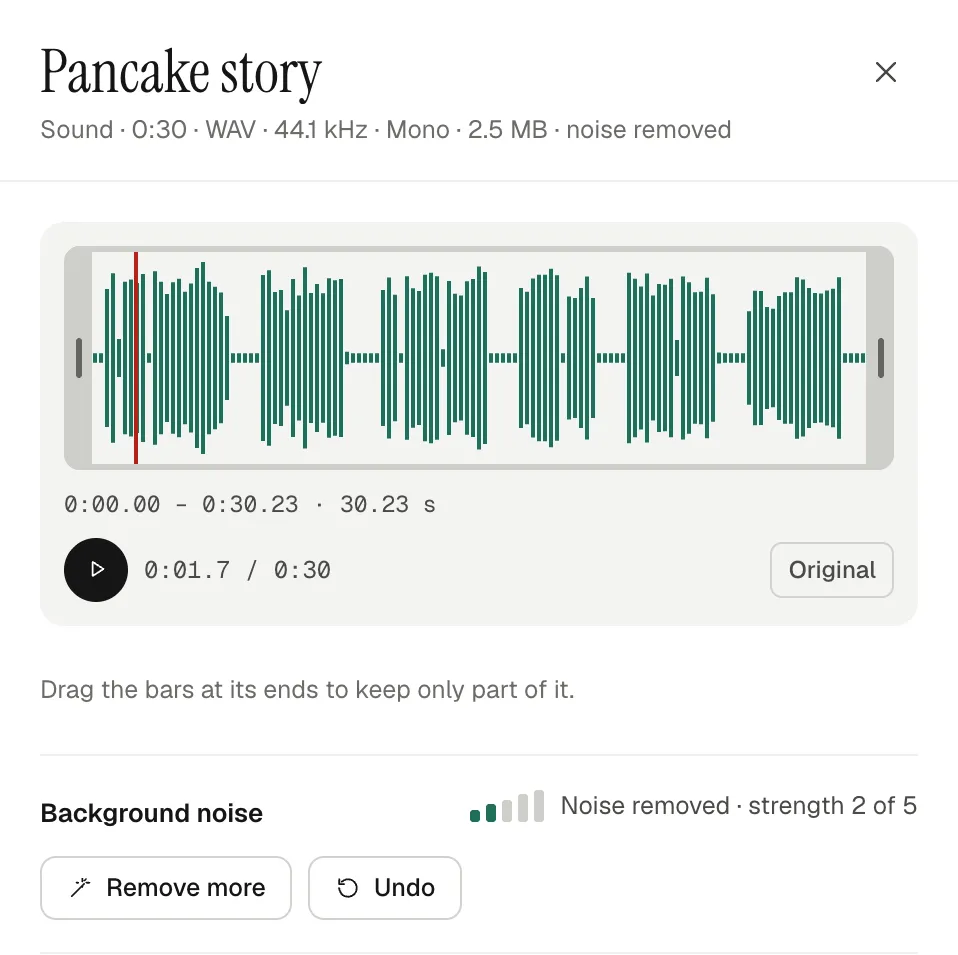
- Leave a second of silence between lines: room to cut, and where noise removal learns your room's hiss.
Clean it up and split it into lines
- Upload it. In Animperia's library, click + and pick Sound. MP3, WAV, OGG, M4A, FLAC and WebM files work, up to 50 MB.
- Take out the hiss. Click the sound and, under Background noise, click Remove noise. Remove more goes up to strength 5, Undo steps back and Original plays the recording as it was. On ours, strength 1 took the hiss in the pauses down by about 8 dB.
- Give it to your narrator. Right-click your character on the stage, pick Give a voice…, choose the sound and paste the script under What it says, which makes English timing more exact (up to 5,000 characters; leave it empty for a longer script). Dragging the sound onto the character works too. The mouth now follows the words.
- Split it into lines. Press B for the Split tool and click the clip in each pause, or put the playhead in a pause and press ⌘B (Ctrl+B on Windows). Every part keeps its speaker.
- Move each line to its shot. Cut a line with ⌘X, open its scene and paste it with ⌘V. If your character is in that scene, it says the line; if not, the line comes in as a voice-over.
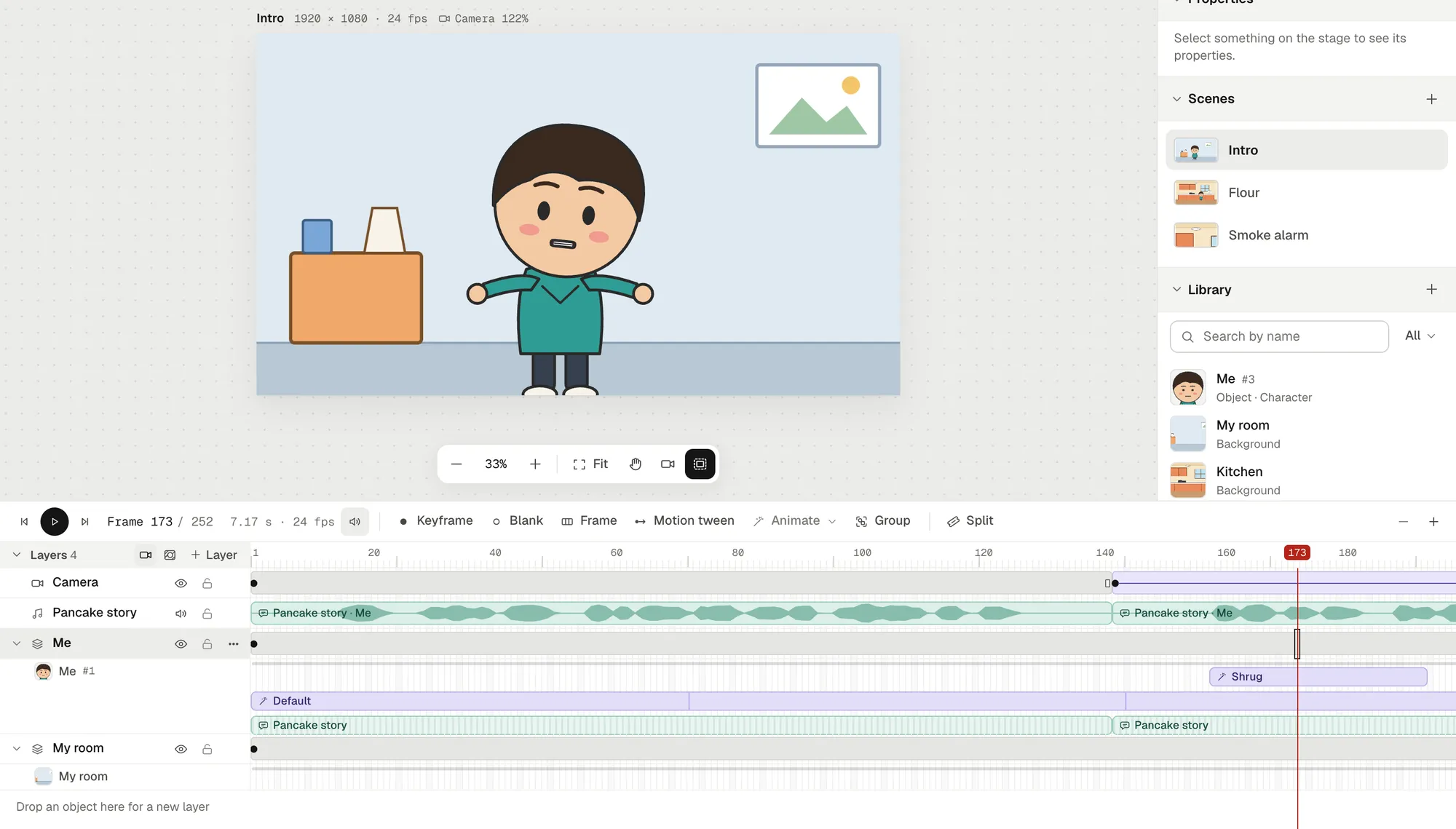
Keep each recording under 10 minutes: longer ones aren't timed for lip sync.
Design your storytime self
The storytime look is simple on purpose: a big round head for the face to act in, a small body, dot eyes, a few flat colors. By hand you'd draw yourself hundreds of times; here you draw yourself once, in parts, and pose them:
- Draw it, or import it. In the library, + → Object: draw on a Blank canvas, or pick SVG file and tick This is a character, and each group of your drawing becomes a part. How to rig a 2D character covers parts and joints.
- Keep the face in parts: eyes, brows and a mouth part named Mouth, which is the one that talks.
- Check the joints. Imported parts join where they meet, not always where they turn: our arms came in jointed mid-sleeve, and the first shrug swung them inward. Drag each joint into place with the Bone tool (M).
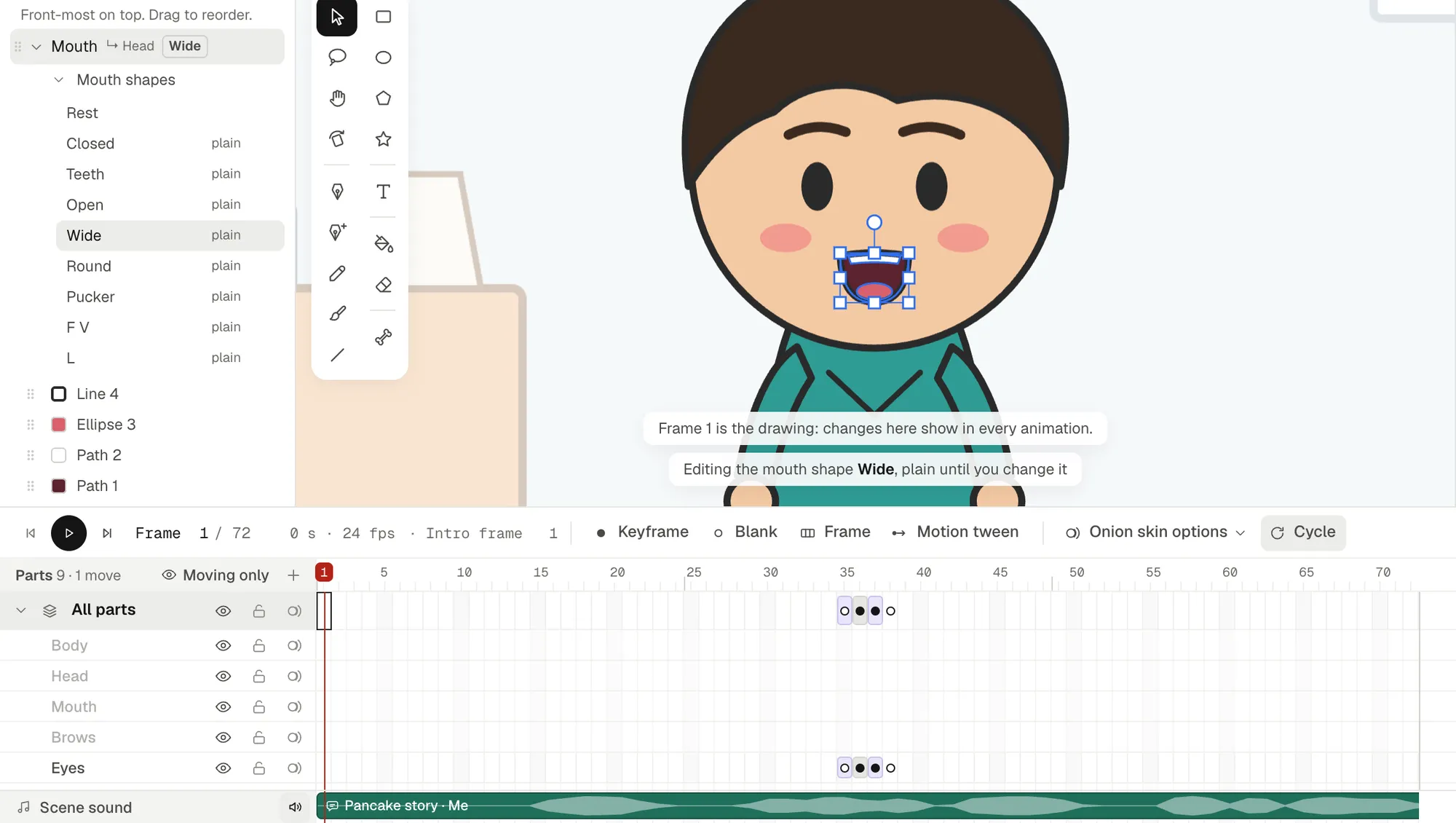
- Look at the mouth shapes. Under Mouth in the parts list, Mouth shapes lists the nine the lip sync uses. They start out plain, made from the mouth you drew, and you can redraw any of them. Our lip sync guide has a free mouth chart.
Make your expressions variations
Storytime runs on reaction faces. Make each one a variation of the same character:
- Click your character in the library and click the copy button on its variation. The copy comes with its drawing and animations.
- Rename it, say Shocked, and click Edit object to change the face: bigger eyes, raised brows, an open mouth.
- In a scene, right-click the character and pick Change variation…. The new face shows in every frame of that layer, just as tall, and clips play its animations of the same name.
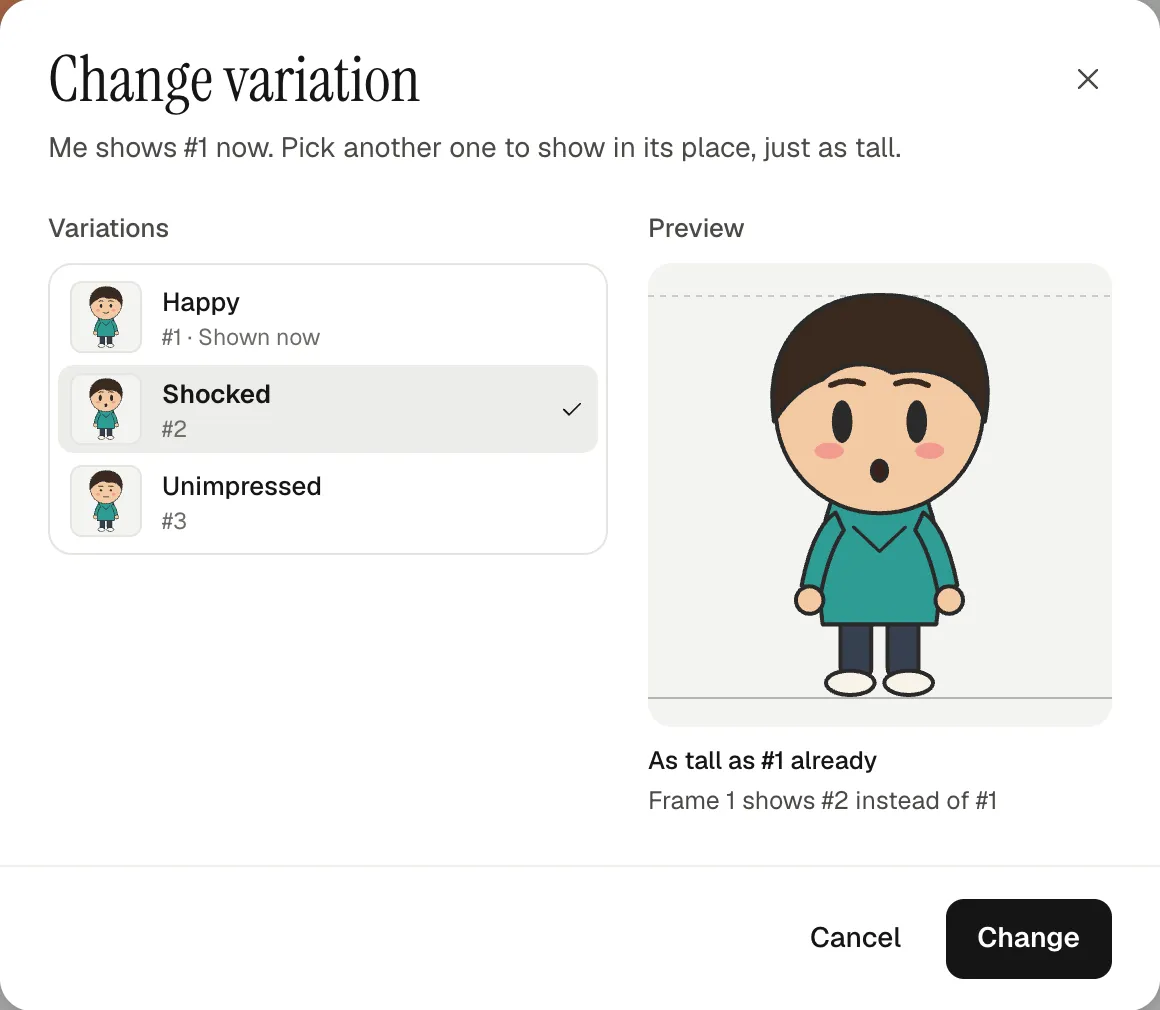
Keep the mouth about as wide in every face. Plain mouth shapes take its size, so our shocked face, with its tiny round mouth, talked with tiny mouths. Make that mouth wider, or redraw its shapes.
Animate a long narration without drawing it all
Five minutes at 24 frames a second is 7,200 frames. Most should cost you nothing:
- The mouth moves by itself with the recording, on the stage and in the video.
- Blinks: in the drawing editor, press F5 until the character's Default timeline is a few seconds long (72 frames is three), then squash the eyes on two frames: tick Only this frame and set Scale Y to 0.1. The Default loops by itself wherever the character goes.
- Gestures: animate a shrug, a point or a facepalm once, then pick Animate: Shrug in the character's row menu and drag the clip under its word.
- Holds: a pose held while you talk reads fine. Move only when the story does.
- The camera: add a Camera layer, put keyframes (F6) at both ends of a line, zoom in on the second and click Motion tween for a slow push-in. Two keyframes without a tween make a cut.
- The next shot: Duplicate scene in a scene's ⋯ menu starts a scene where the last one ends, everything where it stood.
- Voice-over on cutaways: double-click the line and untick Move Me's mouth (lip sync), with your character's name in place of Me. The line still plays, and the mouth stays as drawn.
Two things caught us out. A pasted line lengthens the scene but not its background, which stayed on frame 1: click the background's layer on the last frame and press F5. And a close-up that looks past the canvas's edge shows plain color there in the video, so pan the camera until the picture fills it.
There's more on reuse in how to animate without drawing every frame.
Backgrounds: a few places, reused
Most storytime videos happen in three or four places: your room, the kitchen, school. Draw each one once, flat and simple, at 1920 × 1080 in any app, and upload it with + → Background. Our four scenes use three backgrounds; the kitchen shows up twice, wide and then in a camera close-up. When you talk straight to the viewer, a plain wall keeps the eyes on your face.
Pace it for YouTube
- Open with the hook. "I set off the smoke alarm making pancakes" beats "Hi everyone, welcome back".
- Change the shot every few seconds. Our 30 seconds have five shots and two push-ins.
- Land a picture on the punchline, and hold it a beat after the words.
- Go landscape. 16:9 is YouTube's standard on a computer (YouTube Help, checked 15 October 2026), and Animperia's default canvas is 1920 × 1080.
- Cut a vertical teaser from your best 20 seconds: how to make animated YouTube Shorts.
For the channel side, from a recurring intro to episodes that reuse everything, read how to make an animated series by yourself. For one joke rather than a whole story, see how to make an animation meme.
Export and upload
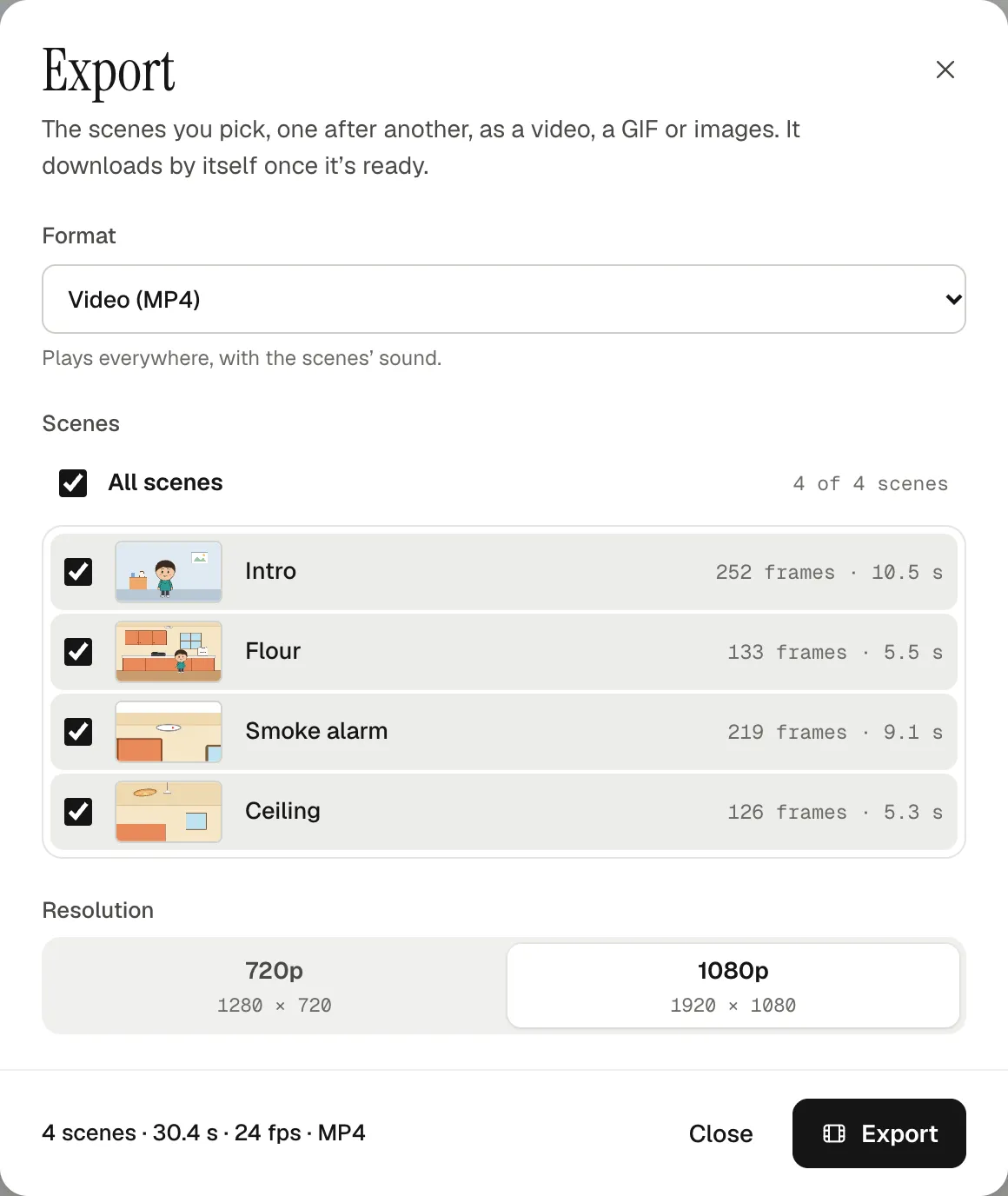
- Click Export, keep Video (MP4) and 1080p, and tick the scenes. They play back to back, in the project's order, with their sound.
- Click Export. It downloads by itself when it's ready: our four scenes made a 30.4-second, 1.6 MB MP4.
- For a thumbnail, pick Still image (PNG): one frame, the playhead's at first, 1920 × 1080 at 1080p.
YouTube recommends MP4 with H.264 video and AAC sound, which is what you get (YouTube Help, checked 15 October 2026). A custom thumbnail should be 16:9, at least 640 pixels wide and a JPG or PNG, and needs a verified account (YouTube Help, checked 15 October 2026).
How long does it take?
Frames show where the time goes. Five minutes at 24 fps, drawn on twos, is 3,600 drawings. Our example has no frame-by-frame drawing at all: one narrator in three faces, three backgrounds, a pancake, a 36-frame shrug and a two-frame blink. The first video is the slow one; the next reuses all of it.
Questions
Do I need to be good at drawing?
No. A storytime narrator is a circle, a body and a few dots: ours is 19 shapes. The writing and the voice matter more.
Do I need a drawing tablet?
No. Shapes, the pen and SVG import work with a mouse, and the rest is clicks and drags.
Can I make one on my phone?
No. Animperia is made for a desktop browser on Windows, Mac or Linux, and we test it in Google Chrome. Record on your phone if you like, then animate on a computer.
How long can a video be?
A scene holds up to 10,000 frames, about 7 minutes at 24 fps, and an export plays up to 500 scenes back to back. YouTube takes up to 15 minutes by default, and longer once your account is verified (YouTube Help, checked 15 October 2026).
How do I start a storytime animation channel?
Make your narrator, a few faces and two or three places, and finish one short video before planning the next. Keep your avatar the same so people recognize it, and start each new video with Duplicate in the last project's ⋯ menu on the projects page.
Is it free?
Yes, Animperia is free during the beta, and the videos have no watermark. The beta has limited places: sign up with your email, and while there's room, you get a link to set your password and start.
YouTube is a trademark of Google LLC. Animperia isn't affiliated with or endorsed by YouTube or the creators named on this page.